Key Takeaways
- Google typically discovers a new URL in about 20 hours, but a page with no links pointing to it can wait weeks or never be found.
- Google revisits a known URL about every 1-7 days (up to 30 days), so edits to older pages don't show up in search right away.
- Once a page is crawled, indexing end to end typically takes about 1.5 hours, while low-quality pages can wait months or never get indexed.
- Crawl capacity can drop in seconds when your server struggles, and recovery can take 1–3 weeks.
- Big changes are slow: a canonicalisation change takes 1–3 weeks and a site move 1–3 months, sometimes 6 months to 1 year+.
How long Google takes to index a page depends on which step you're waiting for. Crawling is Googlebot, Google's robot visitor, finding and downloading your page. Indexing is Google understanding that page and filing it in its giant library, the index. Only indexed pages can show up in search. Here's the typical and slowest time for each step, and what each step means.
How long does Google take to crawl a page?
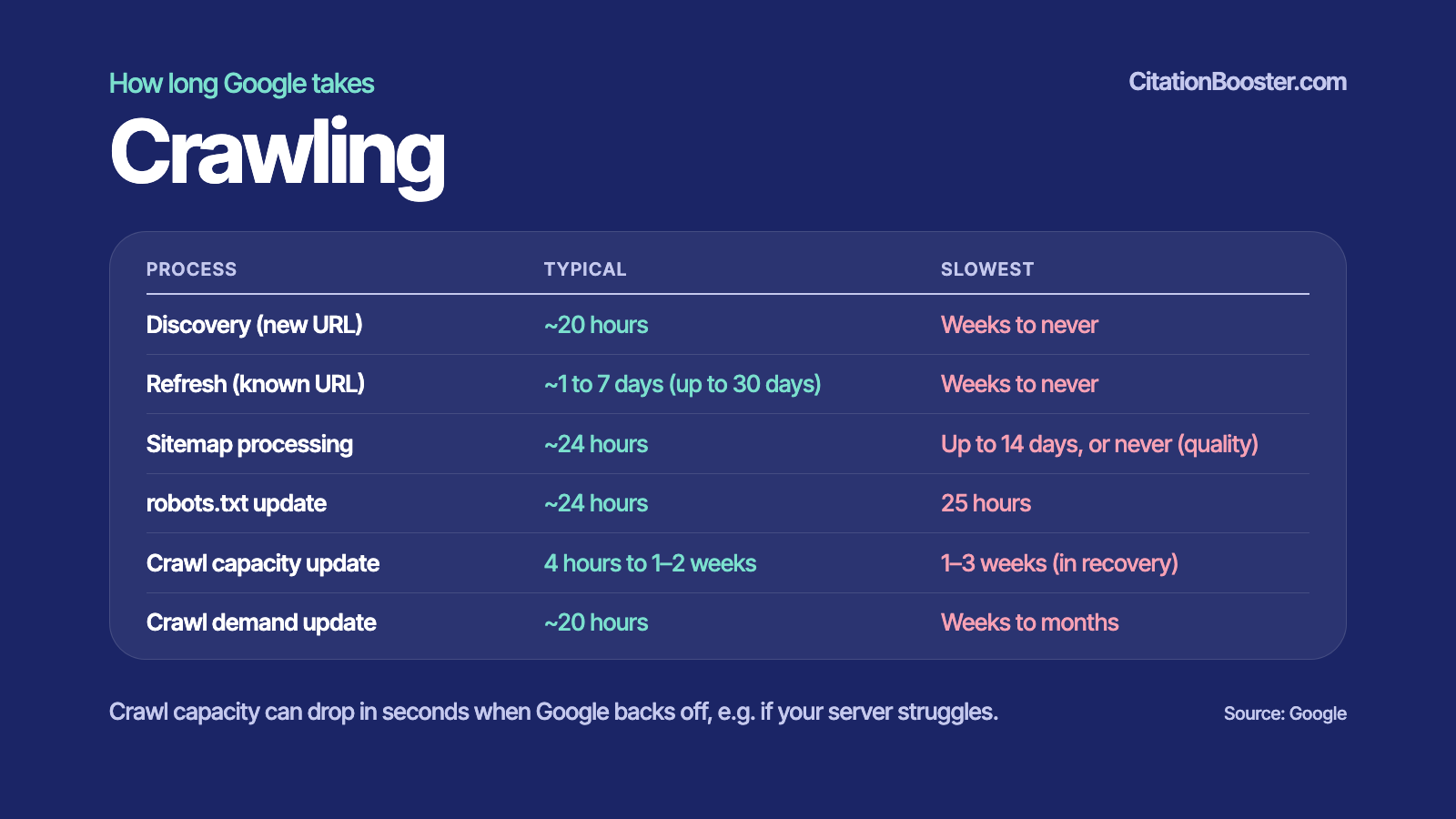
Google typically discovers a new URL in about 20 hours and re-checks a known URL about every 1-7 days (up to 30 days), according to the timing data below.
| Process | Typical | Slowest |
|---|---|---|
| Discovery (new URL) | ~20 hours | Weeks to never |
| Refresh (known URL) | ~1 to 7 days (up to 30) | Weeks to never |
| Sitemap processing | ~24 hours | Up to 14 days, or never (quality) |
| robots.txt update | ~24 hours | 25 hours |
| Crawl capacity update | 4 hours to 1–2 weeks | 1–3 weeks (in recovery) |
| Crawl demand update | ~20 hours | Weeks to months |
Crawl capacity can drop in seconds when Google backs off, e.g. if your server struggles.
Discovery (new URL)
Discovery is Google learning that your page exists at all. Googlebot finds new URLs mostly through links and sitemaps. Typical wait: about 20 hours. With no links pointing to it, a page can sit unnoticed for weeks, or forever.
Refresh (known URL)
A refresh is Googlebot coming back to a page it has seen before to check for changes. About 1-7 days is typical but it can take ~30 days. Popular, often-updated pages get visited more.
Sitemap processing
A sitemap is a list of your URLs, like a table of contents you hand to Google. Google usually reads it within about 24 hours. If Google doubts the site's quality, it can take up to 14 days, or never happen.
robots.txt update
robots.txt is a small file of house rules that tells crawlers which parts of your site to stay out of. Google refreshes its saved copy roughly once a day, so a change takes about 24 hours, at most 25. Google Search Central's robots.txt documentation confirms Google generally caches the file for up to 24 hours.
Crawl capacity update
Crawl capacity is how many pages Google is willing to fetch without slowing your server down. It rises slowly, over 4 hours to 1–2 weeks. It falls fast: if your server struggles, Google backs off within seconds, and recovery can take 1–3 weeks.
Crawl demand update
Crawl demand is how much Google wants to crawl your site, based on how popular and fresh your pages are. Google usually adjusts it within about 20 hours, sometimes weeks to months. Google's crawl budget guide calls capacity plus demand your "crawl budget".
How long does Google take to index a page?
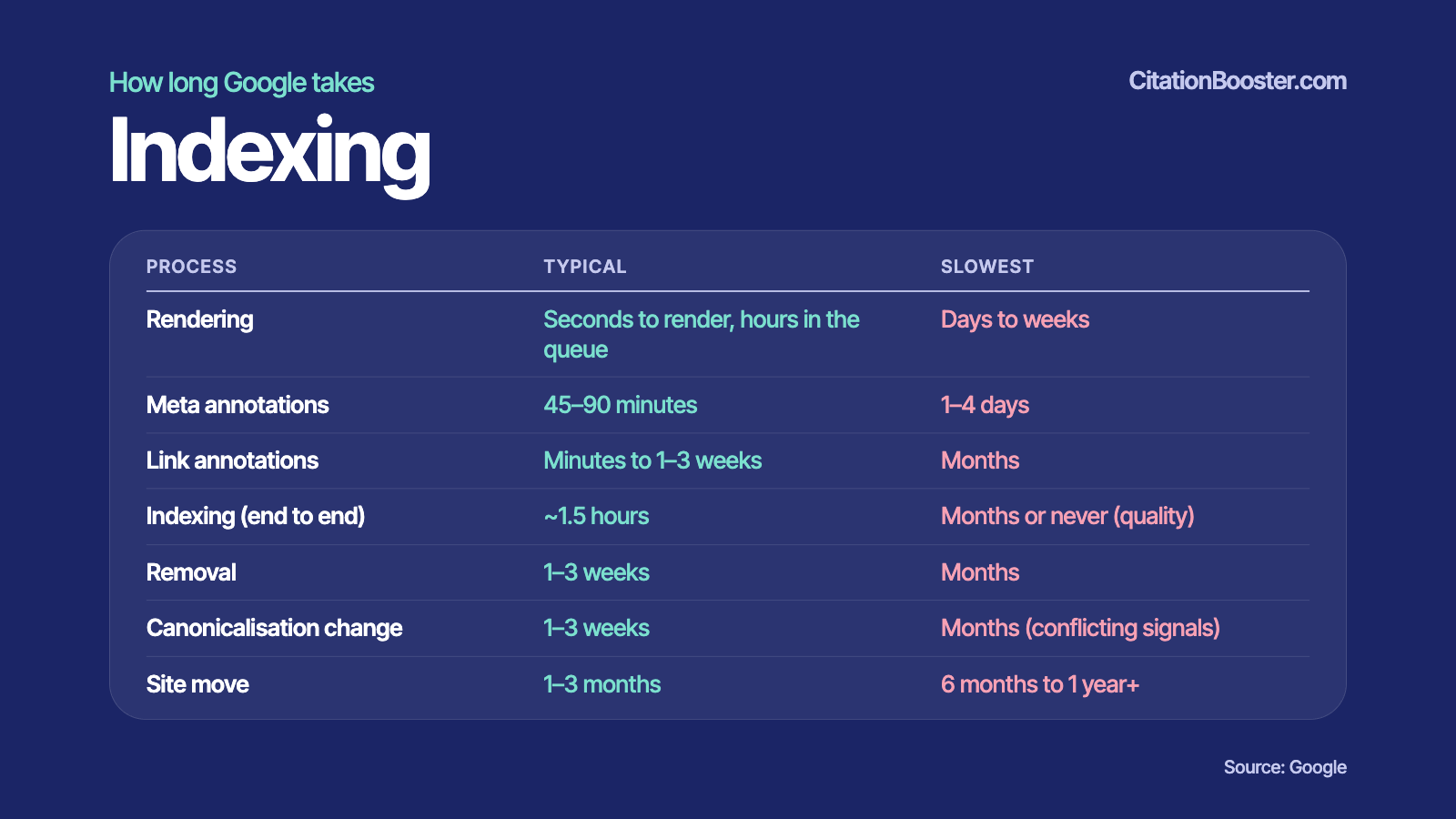
Google typically indexes a crawled page in about 1.5 hours end to end, but pages it judges low-quality can wait months or never be indexed, according to the timing data below (Source: Google).
Rendering
Rendering means Google loads your page the way a browser does, running its JavaScript to see the finished content. Rendering takes seconds, but pages wait in a queue for hours, sometimes days to weeks. Content that needs JavaScript waits too.
Meta annotations
Meta annotations are the labels Google pulls from your page's code: the title, the description and instructions such as noindex. They update in 45–90 minutes, at worst 1–4 days.
Link annotations
Link annotations are Google's notes on your links: where each points and what its clickable text says. Processing takes minutes to 1–3 weeks, months at worst. So new links rarely change rankings overnight.
Indexing (end to end)
Indexing end to end is the full trip from crawl to being stored and searchable. Typical: about 1.5 hours. Slowest: months or never, when Google decides the page isn't useful or unique enough to keep.
Removal
Removal is Google dropping a page after you delete it, return a 404 error or add noindex. Google must recrawl to notice, so expect 1–3 weeks, sometimes months. For urgent cases, Google Search Console's Removals tool hides a URL for about six months.
Canonicalisation change
When several URLs show the same content, Google picks one main version, the canonical, to show in search. Switching that choice takes 1–3 weeks. If your signals disagree, say the canonical tag says one URL and your internal links another, it can take months.
Site move
A site move is switching domains or URL structure, for example from oldsite.com to newsite.com. Google must recrawl and re-file every page: 1–3 months is normal, 6 months to 1 year+ possible.
How can you speed up Google crawling and indexing?
You speed up crawling and indexing by making pages easy to find, fast to fetch and worth keeping:
- New page? Link it from your homepage or another busy page, and add it to your sitemap.
- Urgent page? Use URL Inspection → "Request indexing" in Google Search Console.
- Slow or erroring server? Fix that first. Crawl capacity can drop in seconds and take 1–3 weeks to recover.
- JavaScript-heavy site? Put key text in the HTML so it doesn't wait in the rendering queue.
- Changing canonicals or moving domains? Make every signal (tags, redirects, sitemaps, internal links) point the same way.
- Still not indexed after several weeks? Treat it as a quality problem, not a speed problem.
Frequently asked questions
Can I force Google to index a page instantly?
No. "Request indexing" in Google Search Console's URL Inspection tool asks Google to crawl sooner but guarantees nothing, and repeat requests don't help. Once crawled, indexing typically takes about 1.5 hours. The crawl is usually the longer wait.
What does "Discovered – currently not indexed" mean?
Google knows the URL but hasn't crawled it yet. Google Search Console's page indexing report says Google usually postponed the crawl to avoid overloading the site, meaning crawl capacity or demand is low. Better internal links, a faster server and stronger content help.
Does submitting a sitemap guarantee indexing?
No. A sitemap is a suggestion, not an order. Google typically processes one in about 24 hours, but quality doubts can stretch that to 14 days, or never. Sitemaps help discovery. Quality decides indexing.
Sources: Crawling and indexing timing tables: Source: Google; Google Search Central, "How Google interprets the robots.txt specification"; Google Search Central, "Large site owner's guide to managing your crawl budget"; Google Search Console Help, "Removals tool”; Google Search Console Help, "Page indexing report"